Posts

CRS-3 RommonA upgrade issues

First of all if you try to upgrade rommonA there is no option for rommonA in the FPD filed. upgrade hw-module fpd rommonA location 0/3/CPU0 Eventually you will get following Message and no rommonA upgrade will occur . No lc rommonA on location 0/3/CPU0 need upgrade at this time. you have to force the rommanA upgrade to occur . Following is the command to upgrade the one line card. upgrade hw-module fpd rommonA force location 0/3/CPU0 Starting the upgrade/download of following FPD: =========== ==== ======= ======= =========== =========                                    Current    Upg/Dng Location    Type Subtype Upg/Dng   Version    Version =========== ==== ======= ======= =========== ========= 0/3/CPU0    lc   romm...

Decoding BGP Notification Error

Following Log messages are normal in the IX scenario but decode the error message is quite interesting: We will see why this error message popped up : : %BGP-3-NOTIFICATION: sent to neighbor 10.10.194.236 2/7 (unsupported/disjoint capability) 0 bytes  FFFF FFFF FFFF FFFF FFFF FFFF FFFF FFFF 0039 0104 xx0D 00B4 C06A 1102 1C02 0601 0400 0200 0102 0280 0002 0202 0002 0246 0002 0641 0400 00C4 0D its a raw hex out  of the BGP open message and starts from the marker  16byte FF so the actual output starts from 0039  2 byte length value : 00 39 - 57 1 byte Type : 01 open message 1 byte Version : 04 2 byte ASN : xx0D  [ modified to remove the relevant information ] 2 byte holdtime : 00 B4 - 180 Seconds 4 byte BGP identifier : C06A 1102 [ modified ] 1 byte Optional parameter length : 1C   - 28 bytes Refer RFC: http://tools.ietf.org/html/rfc5492 http://tools.ietf.org/html/draft-ietf-idr-ext-opt-param-02 http://www.iana.org/assignm...

Copying crashinfo file from 7600/6500 module

How to retrieve the data from modules 1st one is easy but its a long way , i prefer 2nd way. 1) attach more disk0:  2)  copy dfc#modnumber -disk0 : ftp://username:pass@ Reference: http://www.cisco.com/en/US/products/hw/switches/ps708/products_tech_note09186a008072c406.shtml#crashinfo

Cisco 12000 XR Turboboot TFTP IP Address

Image
Turboboot is the process we need to proceed to install XR from the scratch . i've observed following behaviour while loading the image (c12k-mini.vm-3.6.2) file from TFTP. Even I've configured the ip address as 192.168.189.1 the bootloader requesting the image from 192.168.100.1 / 1.1.1.1 ( source ip address ) - rommon 6 > set PS1=rommon ! > RET_2_RUTC=1151664252 NT_K=0:0:0:0 RANDOM_NUM=2127452086 SRPCFG=00002000002000000000000000000000 BOOTLDR= CONFGEN=248 CHASSIS_SN=TBM11472326 RET_2_RTS=10:29:35 QST Sun Mar 10 2013 RET_2_RCALTS=1362900734 IOX_ADMIN_CONFIG_FILE= ReloadReason=67 BSI=0 BOOT_DEV_SEQ_CONF= BOOT_DEV_SEQ_OPER= TURBOBOOT=on,disk0,format IP_SUBNET_MASK=255.255.255.0 DEFAULT_GATEWAY=192.168.189.2 IP_ADDRESS=192.168.189.1

Cisco BGP route-map continue statement confusion

Image
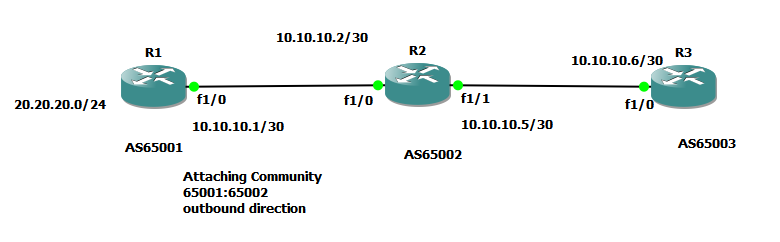
I was confused by the wording of Cisco regarding the route-map continue statement Route maps have a linear behavior, not a nested behavior. Once a route is matched in a route map permit entry with a continue command clause, it will not be processed by the implicit deny at the end of the route-map. Therefore I've designed the following lab to check the actual behaviour  R1 configuration: R1#show run Building configuration... ! hostname R1 ! interface Loopback0 ip address 1.1.1.1 255.255.255.255 ! interface Loopback1 ip address 20.20.20.1 255.255.255.0 ! interface FastEthernet1/0 ip address 10.10.10.1 255.255.255.252 duplex auto speed auto ! router bgp 65001 no synchronization bgp router-id 1.1.1.1 bgp log-neighbor-changes network 20.20.20.0 mask 255.255.255.0 neighbor 10.10.10.2 remote-as 65002 neighbor 10.10.10.2 send-community both neighbor 10.10.10.2 route-map TEST out no auto-summary ! ip bgp-community new-format ! route-map TEST permit 10 set community ...

Fixing Cacti Zoom Refreshing

Image
May be silly feature , but sometimes required in monitoring. Cacti Version : 0.8.8a previous version support this feature seems to be. Cacti refreshing functionally using http meta tag, but if the action is "zoom" meta tag set to 99999 sec. First chage the refresh timer according to your RRD time interval ( default 5 min ) . :/var/www/cacti/include/top_graph_header.php print " "; }else if (isset($_REQUEST["action"]) && $_REQUEST["action"] == 'zoom') { print " "; Changed the content='99999' to content='300' But zoom action sending start , end Unix epoch timers. Therefore modify the /cacti/graph.php as follows. Line 265 '> Edit the value as follows : '> Don't forget to take backup your system .

Producing IPv6 traceroute results in HTML format using NMAP

Image
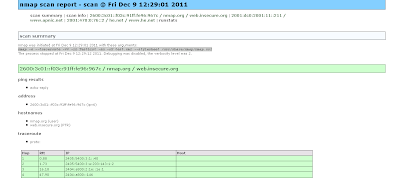
I searched how we can display the IPv6 trace-route results to web in automated manner. There may be different PHP / perl modules but using nmap trace route option we can archive similar fashion. we can have the list of hosts separated by space nmap.org www.apnic.net he.net we can use following command to create the XML output. nmap -6 --traceroute -vv -iL TestList -sn -oX test.xml --stylesheet /usr/share/nmap/nmap.xsl -6 to enable IPv6 -vv increase the verbosity of the oubput --sn no port scan -oX output XML --stylesheet where to find { to translate from XML to HTML } xsltproc test.xml --output test.html