Posts

Showing posts with the label CISCO

Decoding BGP Notification Error

Following Log messages are normal in the IX scenario but decode the error message is quite interesting: We will see why this error message popped up : : %BGP-3-NOTIFICATION: sent to neighbor 10.10.194.236 2/7 (unsupported/disjoint capability) 0 bytes  FFFF FFFF FFFF FFFF FFFF FFFF FFFF FFFF 0039 0104 xx0D 00B4 C06A 1102 1C02 0601 0400 0200 0102 0280 0002 0202 0002 0246 0002 0641 0400 00C4 0D its a raw hex out  of the BGP open message and starts from the marker  16byte FF so the actual output starts from 0039  2 byte length value : 00 39 - 57 1 byte Type : 01 open message 1 byte Version : 04 2 byte ASN : xx0D  [ modified to remove the relevant information ] 2 byte holdtime : 00 B4 - 180 Seconds 4 byte BGP identifier : C06A 1102 [ modified ] 1 byte Optional parameter length : 1C   - 28 bytes Refer RFC: http://tools.ietf.org/html/rfc5492 http://tools.ietf.org/html/draft-ietf-idr-ext-opt-param-02 http://www.iana.org/assignm...
Cisco BGP route-map continue statement confusion

Image
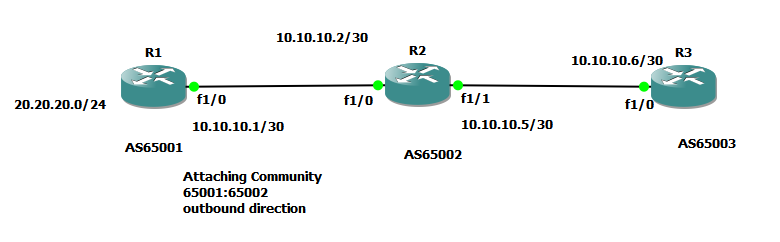
I was confused by the wording of Cisco regarding the route-map continue statement Route maps have a linear behavior, not a nested behavior. Once a route is matched in a route map permit entry with a continue command clause, it will not be processed by the implicit deny at the end of the route-map. Therefore I've designed the following lab to check the actual behaviour  R1 configuration: R1#show run Building configuration... ! hostname R1 ! interface Loopback0 ip address 1.1.1.1 255.255.255.255 ! interface Loopback1 ip address 20.20.20.1 255.255.255.0 ! interface FastEthernet1/0 ip address 10.10.10.1 255.255.255.252 duplex auto speed auto ! router bgp 65001 no synchronization bgp router-id 1.1.1.1 bgp log-neighbor-changes network 20.20.20.0 mask 255.255.255.0 neighbor 10.10.10.2 remote-as 65002 neighbor 10.10.10.2 send-community both neighbor 10.10.10.2 route-map TEST out no auto-summary ! ip bgp-community new-format ! route-map TEST permit 10 set community ...

PPTP Server as Cisco for Mikrotik Client

Image
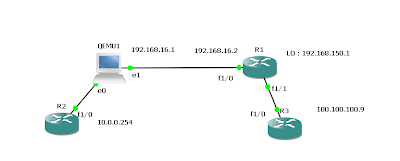
Following configuration explains the Cisco as PPTP server and connecting two sites: Following Configuration needed to enable the VPDN and default server: vpdn enable ! vpdn-group Mtik ! Default PPTP VPDN group accept-dialin protocol pptp virtual-template 1 interface Virtual-Template1 ip unnumbered Loopback0 peer default ip address pool IPPOOL1 ppp encrypt mppe auto required ppp authentication ms-chap-v2 ms-chap pap ip local pool IPPOOL1 192.168.150.10 192.168.150.224 Few more additional things we need to keep the same ip address for the user: aaa new-model ! ! aaa authentication ppp default local aaa authorization network default local ! aaa attribute list Gobi attribute type addr 192.168.150.13 service ppp protocol ip mandatory attribute type route "10.0.0.0 255.255.255.0 192.168.150.13" attribute type interface-config "description Gobi-test" Finally apply the attribute list to the user: username gobi password 0 test username gobi aaa attri...

l2tpv3 configuration reference

Image
Reference Comparing , Designing and Deploying VPNs chap - 02 : L2TPv3 is the enhanced version of L2TPv2 protocol. Mikrotik uses L2TPv2 i suppose but it offer another similar tunneling mechanism as EOIP. L2TPv3 in cisco provides Pseudo-wire services to the customer. L2TPv3 only require the IP connectivity between peers but it can transport Ethernet, 802.1Q , HDLC, PPP framerelay etc. Advantage over MPLS is the customer having the full control of their routing domain. L2TP depolyment methods having 3 topologies LAC - LNS , LNS - LNS , LAC - LAC Following Diagram explain simple LAC - LAC L2TPv3 setup. It uses two types of messages: control connection messages - used for signaling between LCEs session data messages - Used to transport layer 2 protocols and connections Data channel Message Header having Session ID & cookie to correctly associate with the tunnel Deploying dynamic Pseudowires session 1) configure CEF - Its default in IOSs now. 2) configure a loopback in...

shorten the MPLS IOS commands

when it comes to mpls + vrf we can observe some lengthly commands.. R3#show bgp vpnv4 unicast vrf CusA BGP table version is 7, local router ID is 192.168.254.3 Status codes: s suppressed, d damped, h history, * valid, > best, i - internal, r RIB-failure, S Stale Origin codes: i - IGP, e - EGP, ? - incomplete Network Next Hop Metric LocPrf Weight Path Route Distinguisher: 65001:100 (default for vrf CusA) *> 192.168.200.0 192.168.100.1 0 0 65100 i *>i192.168.210.0 192.168.254.8 0 100 0 65101 i how to shorten these commands as usual we can use aliases eg: alias exec shbgpvrf show bgp vpnv4 unicast vrf R3#shbgpvrf CusA BGP table version is 7, local router ID is 192.168.254.3 Status codes: s suppressed, d damped, h history, * valid, > best, i - internal, r RIB-failure, S Stale Origin codes: i - IGP, e - EGP, ? - incomplete Network Next Hop Metric L...

show ip ospf route undocumented command in IOS

This command i think introduced in NX-OS series but IOS also support this but not documented seems to be: I have checked in the following version: R2#show ver Cisco IOS Software, 3700 Software (C3725-ADVENTERPRISEK9-M), Version 12.4(15)T7, RELEASE SOFTWARE (fc3) Not supported command ?? R2#show ip ospf ro?  % Unrecognized command R2# show ip ospf route             OSPF Router with ID (192.168.30.10) (Process ID 10)     Area BACKBONE(0)     Intra-area Route List *   192.168.20.0/30, Intra, cost 64, area 0, Connected       via 192.168.20.1, Serial0/1     Intra-area Router Path List i 192.168.20.2 [64] via 192.168.20.2, Serial0/1, ABR, Area 0, SPF 4     Inter-area Route List *>  192.168.10.64/26, Inter, cost 138, area 0       via 192.168.20.2, Serial0/1 *>  192.168.10.32/28, Inter, cost ...

One drop while tracing - icmp unreachable & traceroute

Have you ever notice the * * while you are tracing some destination ? Cochran#traceroute 192.168.16.1 probe 4 Type escape sequence to abort. Tracing the route to 192.168.16.1 1 172.20.15.5 4 msec 4 msec 0 msec 0 msec 2 172.20.15.2 4 msec * 0 msec * Cochran# When you ping no drops at all Cochran#ping 192.168.16.1 repeat 4 Type escape sequence to abort. Sending 4, 100-byte ICMP Echos to 192.168.16.1, timeout is 2 seconds: !!!! Success rate is 100 percent (4/4), round-trip min/avg/max = 4/5/8 ms This behaviour due to ICMP unreachable rate limit configuration , only the last hop needs to generate icmp-unreachble others normally return the reply via ttl expired ( remember the way traceroute works ) Lindbergh#show ip int brief Interface IP-Address OK? Method Status Protocol FastEthernet0/0 unassigned YES NVRAM administratively down down Serial0/0 172.20.15.2 YES NVRAM up up ...

Exploring Cisco Network Address Translation ( NAT) - Part -I

Image
Even though I worked with NAT configuration it still troublesome when configuring NAT on the Cisco Router (I prefer the Mikrotik way of configuration, simple but powerful). First in the Cisco NAT world we have to understand these 4 terms. Directly taken from Cisco [1] • Inside local address—The IP address assigned to a host on the inside network. This is the address configured as a parameter of the computer OS or received via dynamic address allocation protocols such as DHCP. The address is likely not a legitimate IP address assigned by the Network Information Center (NIC) or service provider. • Inside global address—A legitimate IP address assigned by the NIC or service provider that represents one or more inside local IP addresses to the outside world. • Outside local address—The IP address of an outside host as it appears to the inside network. Not necessarily a legitimate address, it is allocated from an address space routable on the inside. • Outside global address—The IP a...

proxy arp

Image
In the above diagram , both hosts don't have default routes. But both are in the same /16 subnet. When host1 tries to ping host2 will it be able to ping ? Yes this behaviour due to the Proxy Arp feature. Note: Cisco by default enabled the proxy arp feature you have to disable it manually . Check the following Debug messages "debug arp" from the router. When the Arp request for 192.168.20.101 received on the router Fa0/1 it replies with its own mac address of fa0/1. (c200.03fc.0001)and vice versa *Mar 1 00:11:43.071: IP ARP: rcvd req src 192.168.12.154 00aa.00f4.6800, dst 192.168.20.101 FastEthernet0/1 *Mar 1 00:11:43.075: IP ARP: sent rep src 192.168.20.101 c200.03fc.0001,dst 192.168.12.154 00aa.00f4.6800 FastEthernet0/1 *Mar 1 00:13:13.067: IP ARP: rcvd req src 192.168.20.101 00aa.0041.1d00, dst 192.168.12.154 FastEthernet0/0 *Mar 1 00:13:13.067: IP ARP: sent rep src 192.168.12.154 c200.03fc.0000, dst 192.168.20.101 00aa.0041.1d00 FastEther...

can you assign same ip address to two interfaces

cisco if the interface type is point to point we don't need to assign ip address related to RFC 1812 2.2.7 section : Related to this if the interface type is P2P we can assign same ip address to two interfaces. Serial1/0 192.168.1.1 YES manual up up Serial1/1 192.168.1.1 YES manual up up Ok if i ping 192.168.1.2 where it will go ? lets explore it .. Basic diagram R2 (s1/0)-- --(s1/0) R3 -- LO 192.168.6.1/32 R1#show ip route 192.168.1.2 Routing entry for 192.168.1.0/30 Known via "connected", distance 0, metric 0 (connected, via interface) Routing Descriptor Blocks: * directly connected, via Serial1/0 Route metric is 0, traffic share count is 1 directly connected, via Serial1/1 Route metric is 0, traffic share count is 1 so basically load sharing :) further more , R1#show ip cef 192.168.6.1 192.168.6.1/32 nexthop 192.168.1.2 Serial1/0 nexthop 192.168.1.2 Serial1/1 if...

Conditional BGP Advertisement

Image
Introduction: This we can use to advertise the prefixes automatically when one peer goes down rather manually advertise the prefixes. Design Notes: In this example I’m trying to advertise 10.0.0.0/16 through AS 65001 but if the peer (203.143.0.5) goes down automatically advertise the 10.0.0.0/16 through AS 65002(203.143.0.1). To make the configuration works we need to match against a prefix that advertise from that(203.143.0.5) peer. But to make sure that learned through that peer we can use AS-Path match or community based match. Here in this example I’m matching against 172.16.0.0/24 advertise through 65001 and match against the as path ^ 65001. Configuration Notes: This is the only configuration different from normal one: neighbor 203.143.0.1 advertise-map otherblock non-exist-map[exist-map] inblock Better notes on this: Normal Status: R2#show ip bgp neighbors 203.143.0.1 | inc Cond Condition-map inblock, Advertise-map otherblock, status: Withdraw R0#show ip route Gateway of last...

hierarchical queuing on Cisco

Image
Recently i tested on assigning different bandwidth requirement for number of users. Example setup is showed in the following diagram. 512kbps is divided between users and one user can use whole bandwidth when others are not using.I've done some testing on this and i archived the requirement through hierarchical queuing strategy . 1) I setup the natting / and other basic setup- ip route 0.0.0.0 0.0.0.0 10.0.0.2 ip nat inside source list 2 interface FastEthernet0/0 overload access-list 2 permit 192.168.2.0 0.0.0.255 ip nat outside ip nat inside 2) Define the class-maps. 2.1 - Access-list for match the ips. access-list 101 permit ip host 192.168.2.1 any access-list 101 permit ip any host 192.168.2.1 access-list 102 permit ip host 192.168.2.2 any access-list 102 permit ip any host 192.168.2.2 access-list 103 permit ip host 192.168.2.3 any access-list 103 permit ip any host 192.168.2.3 2.2 - match ACL. class-map match-all shape256_pir256_HostA match access-group 101 class-map match-all...