Posts

One drop while tracing - icmp unreachable & traceroute

Have you ever notice the * * while you are tracing some destination ? Cochran#traceroute 192.168.16.1 probe 4 Type escape sequence to abort. Tracing the route to 192.168.16.1 1 172.20.15.5 4 msec 4 msec 0 msec 0 msec 2 172.20.15.2 4 msec * 0 msec * Cochran# When you ping no drops at all Cochran#ping 192.168.16.1 repeat 4 Type escape sequence to abort. Sending 4, 100-byte ICMP Echos to 192.168.16.1, timeout is 2 seconds: !!!! Success rate is 100 percent (4/4), round-trip min/avg/max = 4/5/8 ms This behaviour due to ICMP unreachable rate limit configuration , only the last hop needs to generate icmp-unreachble others normally return the reply via ttl expired ( remember the way traceroute works ) Lindbergh#show ip int brief Interface IP-Address OK? Method Status Protocol FastEthernet0/0 unassigned YES NVRAM administratively down down Serial0/0 172.20.15.2 YES NVRAM up up ...

Exploring Cisco Network Address Translation ( NAT) - Part -I

Image
Even though I worked with NAT configuration it still troublesome when configuring NAT on the Cisco Router (I prefer the Mikrotik way of configuration, simple but powerful). First in the Cisco NAT world we have to understand these 4 terms. Directly taken from Cisco [1] • Inside local address—The IP address assigned to a host on the inside network. This is the address configured as a parameter of the computer OS or received via dynamic address allocation protocols such as DHCP. The address is likely not a legitimate IP address assigned by the Network Information Center (NIC) or service provider. • Inside global address—A legitimate IP address assigned by the NIC or service provider that represents one or more inside local IP addresses to the outside world. • Outside local address—The IP address of an outside host as it appears to the inside network. Not necessarily a legitimate address, it is allocated from an address space routable on the inside. • Outside global address—The IP a...

wirless environment OSPF neigbor issue.

Image
This is setup is simple point to point but the physical transport medium is wireless. when i enable the ospf neighbor getting up but frequently the ospf neighbor up & down. Apr 9 08:09:33.719 LKT: %OSPF-5-ADJCHG: Process 10, Nbr 192.168.61.192 on Vlan2 from FULL to DOWN, Neighbor Down: Dead timer expired Apr 9 08:09:33.731 LKT: %OSPF-5-ADJCHG: Process 10, Nbr 192.168.61.192 on Vlan2 from LOADING to FULL, Loading Done Apr 9 08:12:23.720 LKT: %OSPF-5-ADJCHG: Process 10, Nbr 192.168.61.192 on Vlan2 from FULL to DOWN, Neighbor Down: Dead timer expired Apr 9 08:12:33.735 LKT: %OSPF-5-ADJCHG: Process 10, Nbr 192.168.61.192 on Vlan2 from LOADING to FULL, Loading Done Apr 9 08:15:13.721 LKT: %OSPF-5-ADJCHG: Process 10, Nbr 192.168.61.192 on Vlan2 from FULL to DOWN, Neighbor Down: Dead timer expired Apr 9 08:15:23.737 LKT: %OSPF-5-ADJCHG: Process 10, Nbr 192.168.61.192 on Vlan2 from LOADING to FULL, Loading Done Apr 9 08:19:43.729 LKT: %OSPF-5-ADJCHG: Process 10, Nbr 192.168....

cisco packet switching order

Image
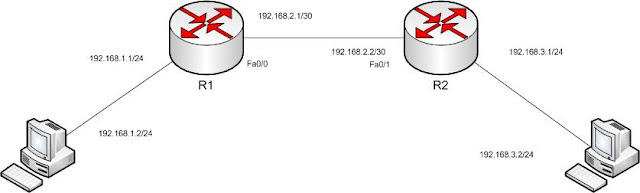
This Lab setup i was trying to understand the Routing TCP/IP vol 1 - cisco packet switching order. In this setup if we enable the debug ip packet on the R1 and see whether packet transferred between Host 1 &  Host 2 ? lets ping from Host2 to Host1 mm execpt some broadcast packet nothing in the debugging output why ? R1#debug ip packet IP packet debugging is on R1# *Mar 1 00:15:00.823: IP: s=0.0.0.0 (FastEthernet0/0), d=255.255.255.255, len 576, rcvd 2 R1# *Mar 1 00:15:03.835: IP: s=0.0.0.0 (FastEthernet0/0), d=255.255.255.255, len 576, rcvd 2 R1# *Mar 1 00:15:06.839: IP: s=0.0.0.0 (FastEthernet0/0), d=255.255.255.255, len 576, rcvd 2 R1# *Mar 1 00:15:29.907: IP: s=0.0.0.0 (FastEthernet0/0), d=255.255.255.255, len 576, rcvd 2 R1# *Mar 1 00:15:32.911: IP: s=0.0.0.0 (FastEthernet0/0), d=255.255.255.255, len 576, rcvd 2 R1# *Mar 1 00:15:35.911: IP: s=0.0.0.0 (FastEthernet0/0), d=255.255.255.255, len 576, rcvd 2 answer is ip packet debugging only ...

proxy arp

Image
In the above diagram , both hosts don't have default routes. But both are in the same /16 subnet. When host1 tries to ping host2 will it be able to ping ? Yes this behaviour due to the Proxy Arp feature. Note: Cisco by default enabled the proxy arp feature you have to disable it manually . Check the following Debug messages "debug arp" from the router. When the Arp request for 192.168.20.101 received on the router Fa0/1 it replies with its own mac address of fa0/1. (c200.03fc.0001)and vice versa *Mar 1 00:11:43.071: IP ARP: rcvd req src 192.168.12.154 00aa.00f4.6800, dst 192.168.20.101 FastEthernet0/1 *Mar 1 00:11:43.075: IP ARP: sent rep src 192.168.20.101 c200.03fc.0001,dst 192.168.12.154 00aa.00f4.6800 FastEthernet0/1 *Mar 1 00:13:13.067: IP ARP: rcvd req src 192.168.20.101 00aa.0041.1d00, dst 192.168.12.154 FastEthernet0/0 *Mar 1 00:13:13.067: IP ARP: sent rep src 192.168.12.154 c200.03fc.0000, dst 192.168.20.101 00aa.0041.1d00 FastEther...

Internet Protocol Control Protocol in PPP links.

Image
 this blog we will look the PPP link's ip route / address negotiation . In the above diagram, there is not static routing / protocol implemented just serial interface with ppp encapsulation link brought up .   if you try to ping the R1 interface ip 192.168.100.1  from R2 interface ip 192.168.1.1 will it succeed ? R2#ping 192.168.100.1 Lets check the router interface: R1#show run int s1/0 Building configuration... Current configuration : 160 bytes ! interface Serial1/0 ip address 192.168.200.1 255.255.255.0 secondary ip address 192.168.100.1 255.255.255.0 encapsulation ppp serial restart-delay 0 R2#show run int s1/0 Building configuration... Current configuration : 110 bytes ! interface Serial1/0 ip address 192.168.1.1 255.255.255.254 encapsulation ppp serial restart-delay 0 end Answer is Yes you can ping. R2#ping 192.168.100.1 Type escape sequence to abort. Sending 5, 100-byte ICMP Echos to 192.168.100.1, ti...

/31 bit Point to Point ip address configuration .

Image
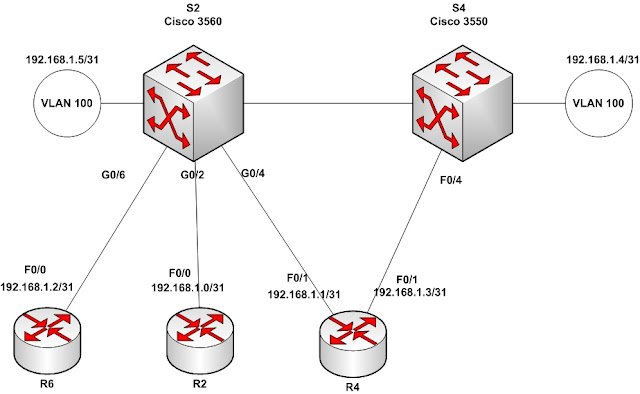
Can we assign /31 address on the point to point link & save 50 % of ip address?  Answer is yes. R2(config)#int fa0/0 R2(config-if)#ip address 192.168.1.0 255.255.255.254 % Warning: use /31 mask on non point-to-point interface cautiously R4(config)#int fa0/0 R4(config-if)#ip address 192.168.1.1 255.255.255.254 % Warning: use /31 mask on non point-to-point interface cautiously Let’s try to ping :) R4#ping 192.168.1.0 Type escape sequence to abort. Sending 5, 100-byte ICMP Echos to 192.168.1.0, timeout is 2 seconds: !!!!! Success rate is 100 percent (5/5), round-trip min/avg/max = 1/2/4 ms Ok do we need privilege mode to ping ? no . R4> ping 192.168.1.0 Type escape sequence to abort. Sending 5, 100-byte ICMP Echos to 192.168.1.0, timeout is 2 seconds: !!!!! Success rate is 100 percent (5/5), round-trip min/avg/max = 1/2/4 ms Let’s check the ip route: R4#show ip route Codes: C - connected, S - static, R - RIP, M - mobile, B - BGP D - EIGRP, EX - EIGRP...