Posts

proxy arp

Image
In the above diagram , both hosts don't have default routes. But both are in the same /16 subnet. When host1 tries to ping host2 will it be able to ping ? Yes this behaviour due to the Proxy Arp feature. Note: Cisco by default enabled the proxy arp feature you have to disable it manually . Check the following Debug messages "debug arp" from the router. When the Arp request for 192.168.20.101 received on the router Fa0/1 it replies with its own mac address of fa0/1. (c200.03fc.0001)and vice versa *Mar 1 00:11:43.071: IP ARP: rcvd req src 192.168.12.154 00aa.00f4.6800, dst 192.168.20.101 FastEthernet0/1 *Mar 1 00:11:43.075: IP ARP: sent rep src 192.168.20.101 c200.03fc.0001,dst 192.168.12.154 00aa.00f4.6800 FastEthernet0/1 *Mar 1 00:13:13.067: IP ARP: rcvd req src 192.168.20.101 00aa.0041.1d00, dst 192.168.12.154 FastEthernet0/0 *Mar 1 00:13:13.067: IP ARP: sent rep src 192.168.12.154 c200.03fc.0000, dst 192.168.20.101 00aa.0041.1d00 FastEther...

Internet Protocol Control Protocol in PPP links.

Image
 this blog we will look the PPP link's ip route / address negotiation . In the above diagram, there is not static routing / protocol implemented just serial interface with ppp encapsulation link brought up .   if you try to ping the R1 interface ip 192.168.100.1  from R2 interface ip 192.168.1.1 will it succeed ? R2#ping 192.168.100.1 Lets check the router interface: R1#show run int s1/0 Building configuration... Current configuration : 160 bytes ! interface Serial1/0 ip address 192.168.200.1 255.255.255.0 secondary ip address 192.168.100.1 255.255.255.0 encapsulation ppp serial restart-delay 0 R2#show run int s1/0 Building configuration... Current configuration : 110 bytes ! interface Serial1/0 ip address 192.168.1.1 255.255.255.254 encapsulation ppp serial restart-delay 0 end Answer is Yes you can ping. R2#ping 192.168.100.1 Type escape sequence to abort. Sending 5, 100-byte ICMP Echos to 192.168.100.1, ti...

/31 bit Point to Point ip address configuration .

Image
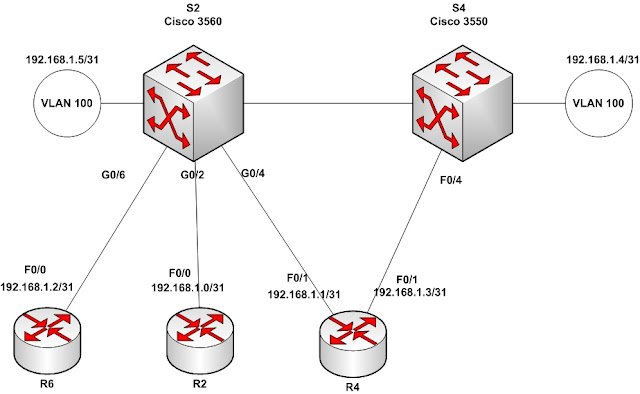
Can we assign /31 address on the point to point link & save 50 % of ip address?  Answer is yes. R2(config)#int fa0/0 R2(config-if)#ip address 192.168.1.0 255.255.255.254 % Warning: use /31 mask on non point-to-point interface cautiously R4(config)#int fa0/0 R4(config-if)#ip address 192.168.1.1 255.255.255.254 % Warning: use /31 mask on non point-to-point interface cautiously Let’s try to ping :) R4#ping 192.168.1.0 Type escape sequence to abort. Sending 5, 100-byte ICMP Echos to 192.168.1.0, timeout is 2 seconds: !!!!! Success rate is 100 percent (5/5), round-trip min/avg/max = 1/2/4 ms Ok do we need privilege mode to ping ? no . R4> ping 192.168.1.0 Type escape sequence to abort. Sending 5, 100-byte ICMP Echos to 192.168.1.0, timeout is 2 seconds: !!!!! Success rate is 100 percent (5/5), round-trip min/avg/max = 1/2/4 ms Let’s check the ip route: R4#show ip route Codes: C - connected, S - static, R - RIP, M - mobile, B - BGP D - EIGRP, EX - EIGRP...

Whether we can give actual details to the forums ?

After the release of the rootkit.com whole Mysql database (http://stfu.cc/rootkit_com_mysqlbackup_02_06_11.gz) 85000 users detail (if we remove the duplicate at least 50000 users) I searched my data obviously listed there.. :( Anyway i used to rotate my passwords and use lame passwords in the forums i feel safe. But after the breach the owners could advise the users of the group may be they don’t have the data now ? Some of the hashes i could reverse. I searched some Sri Lankan users around 30 users i could reverse some of the users password obviously my one too as reference ;). Hope dedicated crackers could use large rainbow table to reverse more of it I don’t wont to waste my time. One reverse hashing site: http://md5.thekaine.de/ ( if you have better sites please let me know) http://md5.my-addr.com/md5_decrypt-md5_cracker_online/md5_decoder_tool.php http://www.netmd5crack.com/cracker/ http://isc.sans.edu/tools/reversehash.html 1023 passwords are - "123456" :) 384 - passw...

mikrotik queue tree - Per connection queuing.

Image
One of the cool feature on Mikrotik queuing is Per Connection Queuing . we can equally distribute the bandwidth among Number of users.[1] This setup explores the per connection queuing in the congestion situation and how to utilize the priority queuing features. [Please note Mikrotik Queue lowest priority value have highest priority eg: queue priority 7 traffic gets highest preference over queue priority 8  ] In this test setup 192.168.92.50 and 51 given 512Kbps per connection queuing(PCQ) Priority 6 . 192.168.52 and 54 placed under 256Kbps PCQ (Priority 8) and further youtube users given 384Kbps irrespective to the queue they are currently placed ( FIFO) . 1) Bridge setup - " Don't forget to enable the bridge firewall :) " /interface bridge add admin-mac=00:00:00:00:00:00 ageing-time=5m arp=enabled auto-mac=yes comment="" disabled=no forward-delay=15s l2mtu=1522 \ max-message-age=20s mtu=1500 name=br_traffic_shaper priority=0x8000 protocol-mode=none...

ANSI color code what to do with windows terminal .

I was trying some telnet coding on NET::TELNET and received some text as the response from mikrotik router. [m [36m/interface [m [m [36methernet when you see such a text file in your windows notepad editor (? ) ( i thought to replace this unwanted character :) ) what you will do ? after some googling i found this is the ANSI color code that supported by Linux terminals, if you do cat it will display correctly . windows there are some resources seems to be outdated anyone find better resources ? http://www.andre-simon.de/zip/download.html#ansifilter http://www.defacto2.net/nfo-files.cfm

can you assign same ip address to two interfaces

cisco if the interface type is point to point we don't need to assign ip address related to RFC 1812 2.2.7 section : Related to this if the interface type is P2P we can assign same ip address to two interfaces. Serial1/0 192.168.1.1 YES manual up up Serial1/1 192.168.1.1 YES manual up up Ok if i ping 192.168.1.2 where it will go ? lets explore it .. Basic diagram R2 (s1/0)-- --(s1/0) R3 -- LO 192.168.6.1/32 R1#show ip route 192.168.1.2 Routing entry for 192.168.1.0/30 Known via "connected", distance 0, metric 0 (connected, via interface) Routing Descriptor Blocks: * directly connected, via Serial1/0 Route metric is 0, traffic share count is 1 directly connected, via Serial1/1 Route metric is 0, traffic share count is 1 so basically load sharing :) further more , R1#show ip cef 192.168.6.1 192.168.6.1/32 nexthop 192.168.1.2 Serial1/0 nexthop 192.168.1.2 Serial1/1 if...