Posts

Lessons Learned - Check List

Before dive into the lessons learned, have to set the stage where I've gathered this information.  Past 10+ years I've consulting multiple large scale SP networks and executed complex DC migrations.  These lessons captured when I failed to notice something and to enforce in the future activities. As the title of this blog have to share what I've learned to a wider audience. Some are well-known fact but keeping a note will help to do a quick check before each meeting. I'll divide it into three parts will follow up with 1.        Don't expect customer knows his/her network: This is especially true in large SP networks; There may be multiple reasons I've seen few widely; components added to patch temporary, stay lifelong and people tend to forget it.  Added functionality no more used and people around that already left the company.  Therefore don't take everything customer says 100% true there is always surprise waits for you. ...

Fixing high DPI issues with Java Application

Image
Cisco optical tools (CTP / CTC ) typically come with Java based application. These applications don't work properly on new laptops with high DPI.  I found the fix for the issue in following site : http://superuser.com/questions/988379/how-do-i-run-java-apps-upscaled-on-a-high-dpi-display "You can modify a Java 8 install to work correctly, using a program to modify the EXE manifests. I changed the setting from true to false in the manifests inside of java.exe and javaw.exe, and now my Swing programs scale correctly in Windows 10 high dpi. I used Resource Tuner to this.]"  it fixed the issue but i think we need to keep modifying when java updates automatically. You might not be able to edit directly on default directory.  Take the java.exe and javaw.exe outside the programfiles ( eg : desktop) modify and copy back the files.

Being a lazy networking guy - Accessing Excel data from Python

Image
Most of the time during the initial network design stage I keep lots of data in Excel. While implementation usually do manual work to extract the data from excel and convert it as CLI configuration. following example I've simulated to create the interface description from the data i've populated in excel. Following tools required in windows : (if you are a Linux guy most probably not reading this :) ) you can find the python windows executable in following URL : Python download link I'm using notepad++   with PyNPP , you can install this from plugin manager. you need to edit the python location in PyNPP option. Installing openpyxl is quite easy on Windows, you can find pip at C:\Python34\Scripts\pip.exe just run following command to install openpyxl "C:\Python34\Scripts> pip install openpyxl " You can do lot of stuff your imagination is the limit . have a look on the openpyxl import openpyxl wb = openpyxl.load_workbook('test.xlsx') sheets ...

Device upgradtion consideration

It's important to consider certain things when upgrading to a newer device. Rack Space power [ AC/ DC / socket type ( C14/C15 - C19/C20 etc) Rack type and mounting brackets and screws IOS Feature comparison does all the features supported in the newer image - double check [ sometime we downgrade the device eg: move the powerful device where most needed] Access to the technicians Interface Type and fibre patch cords [ lc / sc / fc ] , length. If we are moving the device from a different location, ensure that it is properly transported and wrapped in appropriate cartons before proceeding with the migration plan.

CCIE SP TCL IOS XR reachability Script with source address

Following Script will work to check the reach-ability in IOS XR with source address Execute run tclsh Then you can place the TCLSH commands : set i "9.9.0.3" foreach X { 9.9.0.1 9.9.0.2 } { ping -s $i $X } Type escape sequence to abort. Sending 5, 100-byte ICMP Echos to 9.9.0.1, timeout is 2 seconds: !!!!! Success rate is 100 percent (5/5), round-trip min/avg/max = 9/11/19 ms Type escape sequence to abort. Sending 5, 100-byte ICMP Echos to 9.9.0.2, timeout is 2 seconds: !!!!! Success rate is 100 percent (5/5), round-trip min/avg/max = 1/2/9 ms

wireshark continous capture on windows - dumpcap

Image
I've noticed Wireshark memory utilization increases when we use the GUI and it crashes eventually when we use it for continuous capture. Therefore better to use the dumpcap utility which comes with wireshark. First find out the interface , using dumpcap -D C:\Program Files (x86)\Wireshark>dumpcap.exe -D 1. \Device\NPF_{0A4C8668-EAC9-457F-9337-3C4EFCD43AAF} (Ethernet) 2. \Device\NPF_{1F2A8923-0CAD-4160-BBD7-EB11D6B45883} (VirtualBox Host-Only Network) 3. \Device\NPF_{1BB23144-4E34-42D9-92AB-C939B21119A3} (WiFi 2) 4. \Device\NPF_{3C5A536B-5BF8-42AA-A139-32FB360DA95C} (WiFi) 5. \Device\NPF_{A8EF2C83-9A49-4A9E-96E4-2128784ABD6B} (VMware Network Adapter VMnet1) 6. \Device\NPF_{EDB4678A-A120-47A1-A5BF-950A6F1DFA0E} (Local Area Connection 2) 7. \Device\NPF_{F33132F7-A8F9-4E2D-8D35-32A9F662C1C8} (VMware Network Adapter VMnet8) then start the capture, we can define the parameter which rotate the file ( eg: duration , bytes ) Output (files): -w name of file to sav...

IPv6 link-local duplicate bring the ipv6 traffic on POS interface

Issue : ipv6 route not installed , interface up  , ipv6 protocol down. Image : IOS XR 4.2.4 - GSR12810 show ipv6 interface brief #show ipv6 interface brief POS0/2/0/1 [Up/Down] fe80::387c:dfff:fee6:b908 2001:x:x:x::1e But interface is up /up show int POS0/2/0/1 POS0/2/0/1 is up, line protocol is up (APS not Configured ) if you check the ipv6 interface its reveals hence the interface deteced duplicate link local its brings down the ipv6 protocol. #show ipv6 interface pos 0/2/0/1 [KPOS0/2/0/1 is Up, ipv6 protocol is Down, Vrfid is default (0x60000000) IPv6 is down (link local duplicate), link-local address is fe80::387c:dfff:fee6:b908 [DUPLICATE] Global unicast address(es): 2001:x:x:xx::1e, subnet is 2001:x:x:x::1c/126 [TENTATIVE] Joined group address(es): ff02::1:ffe6:b908 ff02::2 ff02::1 Quite strange issue , can related to multiple bug ids : CSCtq57619, CSCeh47611 and CSCtq55280 i've resolved issue after...

CRS-3 RommonA upgrade issues

First of all if you try to upgrade rommonA there is no option for rommonA in the FPD filed. upgrade hw-module fpd rommonA location 0/3/CPU0 Eventually you will get following Message and no rommonA upgrade will occur . No lc rommonA on location 0/3/CPU0 need upgrade at this time. you have to force the rommanA upgrade to occur . Following is the command to upgrade the one line card. upgrade hw-module fpd rommonA force location 0/3/CPU0 Starting the upgrade/download of following FPD: =========== ==== ======= ======= =========== =========                                    Current    Upg/Dng Location    Type Subtype Upg/Dng   Version    Version =========== ==== ======= ======= =========== ========= 0/3/CPU0    lc   romm...

Decoding BGP Notification Error

Following Log messages are normal in the IX scenario but decode the error message is quite interesting: We will see why this error message popped up : : %BGP-3-NOTIFICATION: sent to neighbor 10.10.194.236 2/7 (unsupported/disjoint capability) 0 bytes  FFFF FFFF FFFF FFFF FFFF FFFF FFFF FFFF 0039 0104 xx0D 00B4 C06A 1102 1C02 0601 0400 0200 0102 0280 0002 0202 0002 0246 0002 0641 0400 00C4 0D its a raw hex out  of the BGP open message and starts from the marker  16byte FF so the actual output starts from 0039  2 byte length value : 00 39 - 57 1 byte Type : 01 open message 1 byte Version : 04 2 byte ASN : xx0D  [ modified to remove the relevant information ] 2 byte holdtime : 00 B4 - 180 Seconds 4 byte BGP identifier : C06A 1102 [ modified ] 1 byte Optional parameter length : 1C   - 28 bytes Refer RFC: http://tools.ietf.org/html/rfc5492 http://tools.ietf.org/html/draft-ietf-idr-ext-opt-param-02 http://www.iana.org/assignm...

Copying crashinfo file from 7600/6500 module

How to retrieve the data from modules 1st one is easy but its a long way , i prefer 2nd way. 1) attach more disk0:  2)  copy dfc#modnumber -disk0 : ftp://username:pass@ Reference: http://www.cisco.com/en/US/products/hw/switches/ps708/products_tech_note09186a008072c406.shtml#crashinfo

Cisco 12000 XR Turboboot TFTP IP Address

Image
Turboboot is the process we need to proceed to install XR from the scratch . i've observed following behaviour while loading the image (c12k-mini.vm-3.6.2) file from TFTP. Even I've configured the ip address as 192.168.189.1 the bootloader requesting the image from 192.168.100.1 / 1.1.1.1 ( source ip address ) - rommon 6 > set PS1=rommon ! > RET_2_RUTC=1151664252 NT_K=0:0:0:0 RANDOM_NUM=2127452086 SRPCFG=00002000002000000000000000000000 BOOTLDR= CONFGEN=248 CHASSIS_SN=TBM11472326 RET_2_RTS=10:29:35 QST Sun Mar 10 2013 RET_2_RCALTS=1362900734 IOX_ADMIN_CONFIG_FILE= ReloadReason=67 BSI=0 BOOT_DEV_SEQ_CONF= BOOT_DEV_SEQ_OPER= TURBOBOOT=on,disk0,format IP_SUBNET_MASK=255.255.255.0 DEFAULT_GATEWAY=192.168.189.2 IP_ADDRESS=192.168.189.1

Cisco BGP route-map continue statement confusion

Image
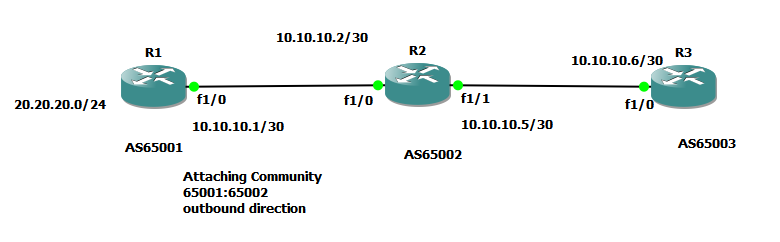
I was confused by the wording of Cisco regarding the route-map continue statement Route maps have a linear behavior, not a nested behavior. Once a route is matched in a route map permit entry with a continue command clause, it will not be processed by the implicit deny at the end of the route-map. Therefore I've designed the following lab to check the actual behaviour  R1 configuration: R1#show run Building configuration... ! hostname R1 ! interface Loopback0 ip address 1.1.1.1 255.255.255.255 ! interface Loopback1 ip address 20.20.20.1 255.255.255.0 ! interface FastEthernet1/0 ip address 10.10.10.1 255.255.255.252 duplex auto speed auto ! router bgp 65001 no synchronization bgp router-id 1.1.1.1 bgp log-neighbor-changes network 20.20.20.0 mask 255.255.255.0 neighbor 10.10.10.2 remote-as 65002 neighbor 10.10.10.2 send-community both neighbor 10.10.10.2 route-map TEST out no auto-summary ! ip bgp-community new-format ! route-map TEST permit 10 set community ...

Fixing Cacti Zoom Refreshing

Image
May be silly feature , but sometimes required in monitoring. Cacti Version : 0.8.8a previous version support this feature seems to be. Cacti refreshing functionally using http meta tag, but if the action is "zoom" meta tag set to 99999 sec. First chage the refresh timer according to your RRD time interval ( default 5 min ) . :/var/www/cacti/include/top_graph_header.php print " "; }else if (isset($_REQUEST["action"]) && $_REQUEST["action"] == 'zoom') { print " "; Changed the content='99999' to content='300' But zoom action sending start , end Unix epoch timers. Therefore modify the /cacti/graph.php as follows. Line 265 '> Edit the value as follows : '> Don't forget to take backup your system .

Producing IPv6 traceroute results in HTML format using NMAP

Image
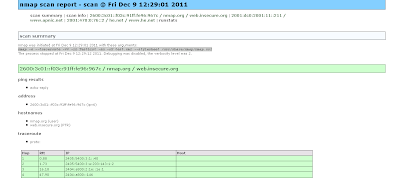
I searched how we can display the IPv6 trace-route results to web in automated manner. There may be different PHP / perl modules but using nmap trace route option we can archive similar fashion. we can have the list of hosts separated by space nmap.org www.apnic.net he.net we can use following command to create the XML output. nmap -6 --traceroute -vv -iL TestList -sn -oX test.xml --stylesheet /usr/share/nmap/nmap.xsl -6 to enable IPv6 -vv increase the verbosity of the oubput --sn no port scan -oX output XML --stylesheet where to find { to translate from XML to HTML } xsltproc test.xml --output test.html

PPTP Server as Cisco for Mikrotik Client

Image
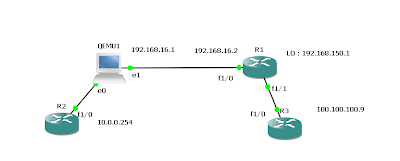
Following configuration explains the Cisco as PPTP server and connecting two sites: Following Configuration needed to enable the VPDN and default server: vpdn enable ! vpdn-group Mtik ! Default PPTP VPDN group accept-dialin protocol pptp virtual-template 1 interface Virtual-Template1 ip unnumbered Loopback0 peer default ip address pool IPPOOL1 ppp encrypt mppe auto required ppp authentication ms-chap-v2 ms-chap pap ip local pool IPPOOL1 192.168.150.10 192.168.150.224 Few more additional things we need to keep the same ip address for the user: aaa new-model ! ! aaa authentication ppp default local aaa authorization network default local ! aaa attribute list Gobi attribute type addr 192.168.150.13 service ppp protocol ip mandatory attribute type route "10.0.0.0 255.255.255.0 192.168.150.13" attribute type interface-config "description Gobi-test" Finally apply the attribute list to the user: username gobi password 0 test username gobi aaa attri...

l2tpv3 configuration reference

Image
Reference Comparing , Designing and Deploying VPNs chap - 02 : L2TPv3 is the enhanced version of L2TPv2 protocol. Mikrotik uses L2TPv2 i suppose but it offer another similar tunneling mechanism as EOIP. L2TPv3 in cisco provides Pseudo-wire services to the customer. L2TPv3 only require the IP connectivity between peers but it can transport Ethernet, 802.1Q , HDLC, PPP framerelay etc. Advantage over MPLS is the customer having the full control of their routing domain. L2TP depolyment methods having 3 topologies LAC - LNS , LNS - LNS , LAC - LAC Following Diagram explain simple LAC - LAC L2TPv3 setup. It uses two types of messages: control connection messages - used for signaling between LCEs session data messages - Used to transport layer 2 protocols and connections Data channel Message Header having Session ID & cookie to correctly associate with the tunnel Deploying dynamic Pseudowires session 1) configure CEF - Its default in IOSs now. 2) configure a loopback in...

Modifying the Wireshark Column.

Image
Basically i had a packet capture file where i need to check the ICMP sequence number to check any packet drops. going each packet one by one and finding out the sequence number is a tedious job. So i was looking to find a way to add another column to display the icmp sequence number. Its quite easy 1) Go to Edit -> Preference 2) Add a new column and select the field type as custom and give the filter as icmp.seq 3) You can see following result . According to our requirement we can modify the field type.

Cost Effective 1 Port Terminal Server Rs232 using mikrotik / 3G

out of band management is critical for the network operation. when searching solution for console access through rs232 and 3G i came across Mikrotik serial connection option. I haven't tested the 3G setup yet but quite impressive options available in 79$ Mikrotik router for RS232 access: 1st have to set the baud-rate and similar settings : [admin@Console_Tik] > port export # jan/02/1970 00:32:05 by RouterOS 5.5 # software id = WE49-11I9 # /port set 0 baud-rate=9600 data-bits=8 flow-control=none name=serial0 parity=none \ stop-bits=1 /port firmware set directory=firmware [admin@Console_Tik] > 2nd if we are using for console access we need to disable the console port option on mikrotik as follows : [admin@Console_Tik] > system console print Flags: X - disabled, U - used, F - free # PORT TERM 0 X serial0 vt102 From mikrotik we can directly access the co...

shorten the MPLS IOS commands

when it comes to mpls + vrf we can observe some lengthly commands.. R3#show bgp vpnv4 unicast vrf CusA BGP table version is 7, local router ID is 192.168.254.3 Status codes: s suppressed, d damped, h history, * valid, > best, i - internal, r RIB-failure, S Stale Origin codes: i - IGP, e - EGP, ? - incomplete Network Next Hop Metric LocPrf Weight Path Route Distinguisher: 65001:100 (default for vrf CusA) *> 192.168.200.0 192.168.100.1 0 0 65100 i *>i192.168.210.0 192.168.254.8 0 100 0 65101 i how to shorten these commands as usual we can use aliases eg: alias exec shbgpvrf show bgp vpnv4 unicast vrf R3#shbgpvrf CusA BGP table version is 7, local router ID is 192.168.254.3 Status codes: s suppressed, d damped, h history, * valid, > best, i - internal, r RIB-failure, S Stale Origin codes: i - IGP, e - EGP, ? - incomplete Network Next Hop Metric L...

MPLS LAB for experiment.

Image
This is the lab prepared using the L2IOU (http://tinyurl.com/69j77ju ) NETMAP : 1:0/0 3:0/0 1:0/1 4:0/0 2:0/0 3:0/1 2:0/1 4:0/1 3:0/2 5:0/0 4:0/2 5:0/1 5:0/3 6:0/0 5:0/2 7:0/1 6:0/1 7:0/0 7:0/2 8:0/0 7:0/3 9:0/0 8:0/1 10:0/0 9:0/1 11:0/0 root@box:/home/tc# cat labstart_mpls #!/bin/sh if [ "`pgrep i86bi`" ] then echo "" echo "" echo "The lab is already loaded" echo "" echo "" else echo "" echo "" echo please wait for the Lab to be loaded.. echo "" ./wrapper -m ./i86bi_linuxl2-upk9-ms.M -p 2001 -- -c configs/R1.cfg -e1 -s0 1 > /dev/null 2>&1 & sleep 5 echo R1 loaded ./wrapper -m ./i86bi_linuxl2-upk9-ms.M -p 2002 -- -c configs/R2.cfg -e1 -s0 2 > /dev/null 2>&1 & sleep 5 echo R2 loaded ./wrapper -m ./i86bi_linuxl2-upk9-ms.M -p 2003 -- -c configs/R3.cfg -e1 -s0 3 > /dev/null 2>&1 & sleep 5 echo R3 loaded ./wrapper -m ./i86bi_...